Synchronous vs. Asynchronous Approval Gates: Which Should You Use?
Match the gate to the risk, or lose either speed or oversight.
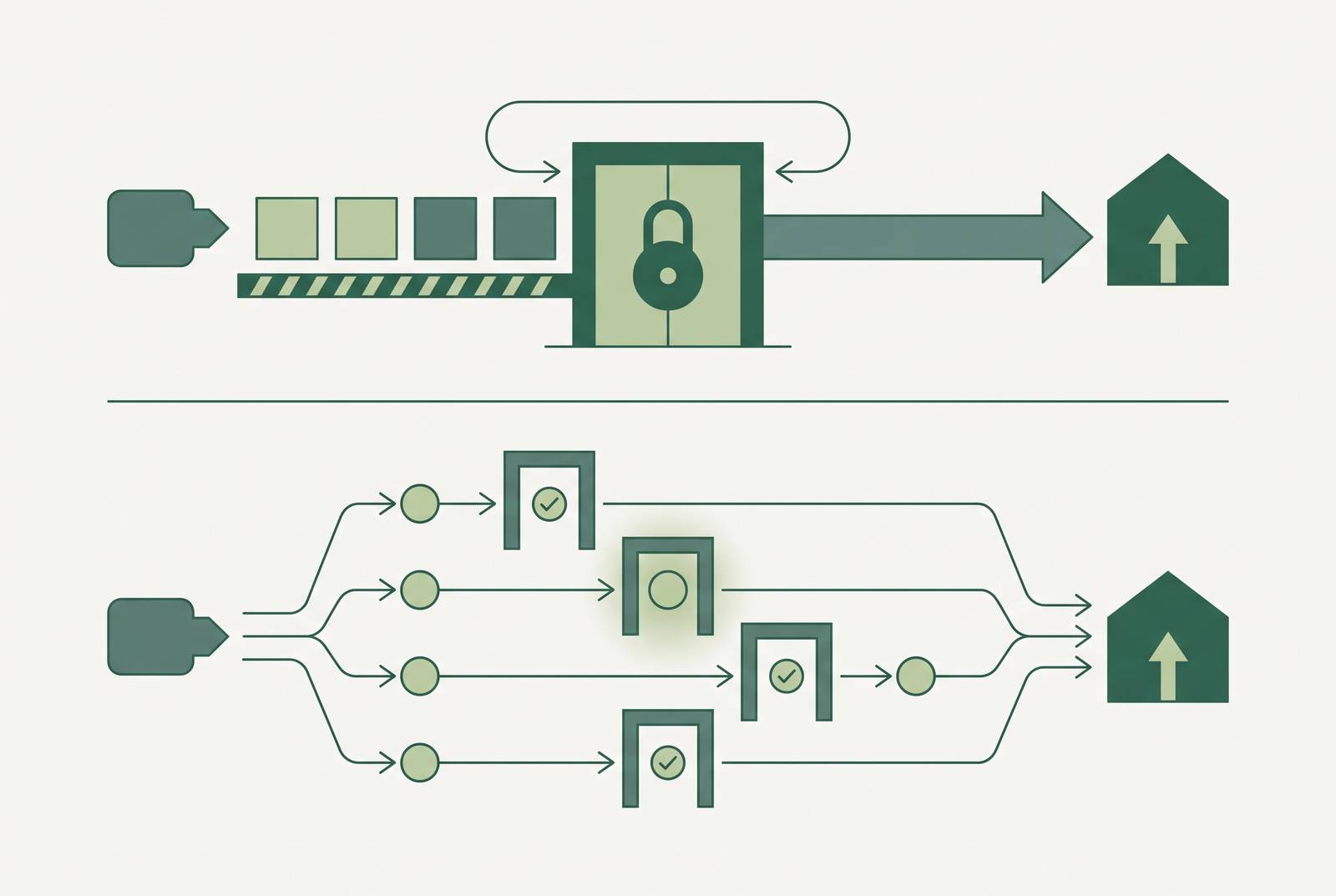
When an AI agent needs a human to check its work before moving on, you have two basic options. You can make it stop and wait. Or you can let it keep going while a person reviews in the background. Picking the wrong one either kills your speed or kills your oversight.
A synchronous gate stops the workflow completely. The agent pauses at a decision point. Nothing else moves until a human says yes. An asynchronous gate logs the decision in a queue. It lets the agent keep working on other items while that one waits. A third option is called parallel feedback. It lets the agent act right away while a human reviews at the same time. The system only stops if the review comes back negative. Each pattern suits a different level of risk. It is not just a style preference.
Companies bring AI agents in to move faster. Then they find that the oversight layer they added either wipes out the speed gain or never really worked as oversight at all. Most teams treat "synchronous" and "asynchronous" as a style choice. They are actually two different tools built for two different risk levels. Picking the wrong one leads to dangerous rubber-stamping on one end. On the other end, your workflow grinds to a halt.
The numbers back this up. Roughly 48% of AI agents running in production today have no security or governance attached at all. Only 14.4% of organizations can say every agent they deployed went live with full security and IT sign-off. Kiteworks has reported that 65% of firms have already been hurt by an AI agent security incident. Deployment outpaced governance a while back. That gap now shows up as real damage, not just theoretical risk.
A synchronous gate stops the whole workflow cold. The agent hits a decision point, halts, and waits for a human to approve. Nothing downstream moves until that happens. That gives you maximum control, at maximum delay. One slow reviewer does not just hold up their own item. They block everything queued behind them. Use this when an action cannot be undone and getting it wrong costs more than the wait does. Nobody wants an agent approving a six-figure wire transfer automatically just to save four hours.
An asynchronous gate works differently. The agent logs the decision, drops the request into a queue, and keeps working on everything else. That one item waits for a response. The bottleneck gets isolated instead of spreading through the system, and delays shrink. But the engineering gets harder. A live question now drives it: what happens if a human rejects something after the agent already acted downstream as if approval were coming? You need that recovery path ready before the queue ever goes live. Do not wait for the first incident to force the issue.
The third pattern, parallel feedback, pushes delays even lower. The agent acts right away while a human reviews at the same time. The system only stops if that review comes back negative. It is the fastest of the three, and also the most limited. It only works when the action is reversible enough that stopping mid-execution is actually recoverable. Using it on something that cannot be undone leaves nothing to roll back to.
Microsoft Dynamics 365 CRM (a popular customer relationship management platform) shows what blocking execution looks like at scale. Running a synchronous gate against a bulk update of several thousand records produces frozen screens, delayed processes, and timeout errors. A gate built for one record, applied to ten thousand, breaks exactly the way you would expect.
Classify a decision before you pick a gate type
Reversibility comes first, and it is not close. Financial transactions, deleted records, customer-facing messages, regulatory filings — these are hard or impossible to walk back. They warrant a synchronous gate. At minimum, use a parallel-feedback gate with a rollback path that you have actually tested, not just assumed to exist.
Blast radius is the second factor. Teams often mix it up with reversibility, but that is a mistake. They measure different things. Ask yourself: how many downstream records, people, or processes does a bad decision touch? An agent drafting an internal summary has a small blast radius even when the summary is wrong. An agent issuing refunds, editing records in a business management system, or sending a bulk email to every client on file has a large one. That alone earns tighter controls, no matter how reversible the action technically is.
Confidence is the third factor, and most teams ignore it. When the AI model gives an uncertainty score, a low-confidence output inside a high-stakes category should trigger escalation on its own. That should happen even if no other rule requires it.
Rely on action-category rules alone and two failures follow, reliably. First, latency: a synchronous gate on a time-sensitive workflow adds real delay, anywhere from 15 to 45 minutes per alert depending on configuration. Teams facing that delay tend to just remove the gate rather than fix it. That leaves zero oversight where there used to be some. Second, fatigue: sloppy trigger logic floods reviewers with low-risk noise. The one decision that actually mattered gets buried in the pile.
How to set up synchronous gates without creating a deadlock
Synchronous gates earn their place under specific conditions. The action is irreversible or very expensive to undo, like a payment already processed or a compliance filing already submitted. The rules of a regulatory regime demand proof of human approval before the action happens — SOC 2 Type II (a security audit standard), HIPAA (US health data privacy law), and the EU AI Act's Article 14 (which covers high-risk AI systems) all require this. Volume stays low enough that a pause does not create a system-wide backlog. And getting the decision right matters more than keeping the workflow moving.
SOC 2 Type II auditors test specifically for logs proving who approved what and when. No trail, no pass. A synchronous gate with proper attribution logging satisfies that requirement directly. That is a big part of why it survives in regulated environments even when it is slower than everyone would like.
The deadlock risk people worry about is a configuration failure. It is not built into the gate type itself. One slow approver blocking an entire line happens because nobody built in a release valve. Fix it with a hard time limit: 24 to 48 hours is a reasonable range. After that, the item escalates to a supervisor or gets rejected automatically instead of sitting there forever. Route requests to the reviewer with the right knowledge and actual availability, not whoever happens to hold the matching job title. Give reviewers pre-assembled context — the evidence, the assumptions, the recommended action — so the decision takes thirty seconds instead of requiring them to rebuild the whole situation from scratch.
Read access and the permission to change records have to stay separate. That is a governance principle on paper. A synchronous gate is where that boundary actually gets enforced in practice, rather than just written down in a policy document.
When to use an asynchronous gate instead of a synchronous one
Asynchronous gates make sense when volume runs high enough that a blocking pause on any single item would back up the whole system. They fit when actions are reversible or staged. They work when reviewer availability is unpredictable but the workflow can tolerate a bounded delay. They also work when the agent's work across items is genuinely independent, so approving item A has nothing to do with the pending decision on item B.
Dynamics 365 CRM's background processing shows the shape of this clearly. Asynchronous workflows handle bulk updates across large record sets without the frozen screens and timeout errors that synchronous processing produces at scale. Only the specific gated item pauses. Everything else — other deals, other emails — keeps moving.
Most teams skip rejection handling, and that gap causes real damage later. If the agent has already taken downstream actions assuming approval was coming, and a human then says no, you need a defined recovery path. Build it before the queue goes live, not during the first production incident. That means explicit state tracking: what has the agent already done, what is reversible, and in what order does the rollback actually happen.
Time limits matter here too, and skipping them is the same mistake in a quieter form. An asynchronous queue with no resolution deadline is still a deadlock, just a slower-moving one. Items sitting unresolved past a set threshold need to escalate or resolve automatically, the same as a synchronous gate.
Approval fatigue: when too many requests break oversight entirely
The approval fatigue problem matters as much as throughput. Moltbook is the clearest case study on record for what happens when the ratio of agents to humans breaks down. The platform ran 1.5 million autonomous agents under roughly 17,000 human operators — an 88-to-1 ratio. Meaningful oversight became physically impossible at that scale. The direct trigger was an exposed, misconfigured database that let any actor hijack any agent on the platform. But the ratio is what turned that failure catastrophic instead of contained.
A subtler version of this appears in well-intentioned teams too. One engineering team put a human approval gate on every action above a certain risk score. That sounds responsible enough on paper. By month two, they were sitting on over 200 review requests. Reviewers started batching approvals just to stay above water. Six months in, the approval rate looked nearly perfect, and real oversight had all but vanished. Every box got checked. Nobody was actually watching.
Approval fatigue is not a user experience problem you fix with a better dashboard. Past a certain agent-to-operator ratio, the entire oversight model breaks. The problem is structural.
The fix that works is policy-level rules that handle low-risk, reversible decisions automatically. That frees human review for the decisions that genuinely need judgment. It concentrates oversight where it can still function. Loose trigger logic that escalates everything does the opposite: it buries the decision that mattered under a stack of ones that did not.
How to keep a clear record of every gate decision
Every gate event — synchronous or asynchronous — needs to leave behind a decision record. It should show who approved it, what exactly they approved, when, under which policy version, and why. Attribution has to trace to an individual person, full stop. A service account (a shared automated login) standing in for a named human is the single most common audit failure pattern found in AI-influenced workflows.
How long you must keep those records varies by regulation, and none of the timelines are negotiable. SOX-relevant systems (US financial reporting rules) need at least 366 days of operational logs and seven years of audit work papers. HIPAA calls for six years. PCI DSS v4.0 (payment card security standards) sets its own retention requirements for logs. The EU AI Act's Article 12 sets a floor of six months for high-risk AI systems.
AI systems that generate text or decisions complicate this in a way traditional software never did. A non-deterministic model — one that may not produce the same output twice from the same input — means you cannot reconstruct a decision after the fact from logs alone. The only reliable answer is a proof bundle. It captures the data, the logic, the model version, and the intermediate reasoning at the moment of decision. It is frozen in place rather than pieced back together later from memory.
The decision record has to connect end to end. It should show the evidence presented to the approver, the recommendation and the assumptions behind it, the human's actual decision including any reasoning or exceptions, the action that followed, and the measured outcome — including outcomes that failed or came back inconclusive.
Access controls and the ability to pause or revoke an agent
Governance is what you get when approval gates, access controls, logs, and execution controls all work together. No single one of them provides it alone. A gate with no enforcement behind it is a suggestion, not a control. Plenty of "governed" agent deployments are running on suggestions dressed up as policy.
The ability to pause or revoke an agent needs to live at the access layer, not buried inside the agent's own logic. Your team should be able to pause execution, narrow what an agent can touch, or cut off its access entirely without changing a line of code. If an agent is compromised, you need to revoke its access at the network level right away, not on the next deployment cycle two weeks out.
As MCP (a standard way for AI agents to connect to tools and services) becomes a common integration layer for agent systems, enforcement at the tool level gets sharper. Conditional access rules tied to specific tool attributes — including whether a given tool can only read data or can also change it — let your team control what an approved agent can actually do. You are not just approving it once and hoping the scope stays fixed forever.
Scale is the last piece, and underestimating it is easy. Across most enterprises, service accounts, automation, and agent identities now substantially outnumber human identities. Plenty of those identities were created for a quick experiment and never cleaned up. They quietly persist long after anyone remembers why they exist. Every one of them needs a named owner: someone who defines what the workflow is supposed to do, approves the scope of its permissions, and can remove access the moment its behaviour stops matching that definition.
Sources
- Synchronous vs Asynchronous Workflows in Dynamics 365 CRM: Best Practices for Large Data Sets – Part 1 - Microsoft Dynamics 365 CRM Tips and Tricks
- Orchestrating Asynchronous Workflows (How Are They Different from Synchronous?)
- AI Agent Approval Workflows: Human Oversight That Scales [2026]
- Async Approval Gates: Reducing Coordination Drag Without Slowing Workflows | Operaitions
- AI Agent Approval Gates: Step-by-Step Guide